LongnoteA private symptom tracker for iPhone
Symptoms are hard to describe from memory.
Longnote keeps a long, honest note of how you feel. Log a symptom in seconds, mark where it hurts on a body atlas, see which patterns hold up, and bring a clean record to your appointment. Your record lives on your iPhone.
01Recognition
Memory · Record
“How often? Since when? Worse than last month?”
Every appointment opens with questions a tired memory answers badly. Not because you don’t pay attention, but because once a bad day is over it blurs into the others.
| What memory offers | What the record says |
|---|---|
| “Maybe twice a week?” | Headache on 9 of the last 30 days. Six of them after under six hours of sleep. |
| “It moves around.” | Left shoulder since 14 April. Neck on 11 of those days. Right side twice. |
| “It’s been bad lately.” | Average 5 of 10 this month, down from 7 of 10 in June. |
| “I tried something for it.” | Ibuprofen on 7 days; on 5 of them the next entry was lower. |
02Logging
Seconds, not forms
Log it in seconds, from the couch, with one hand.
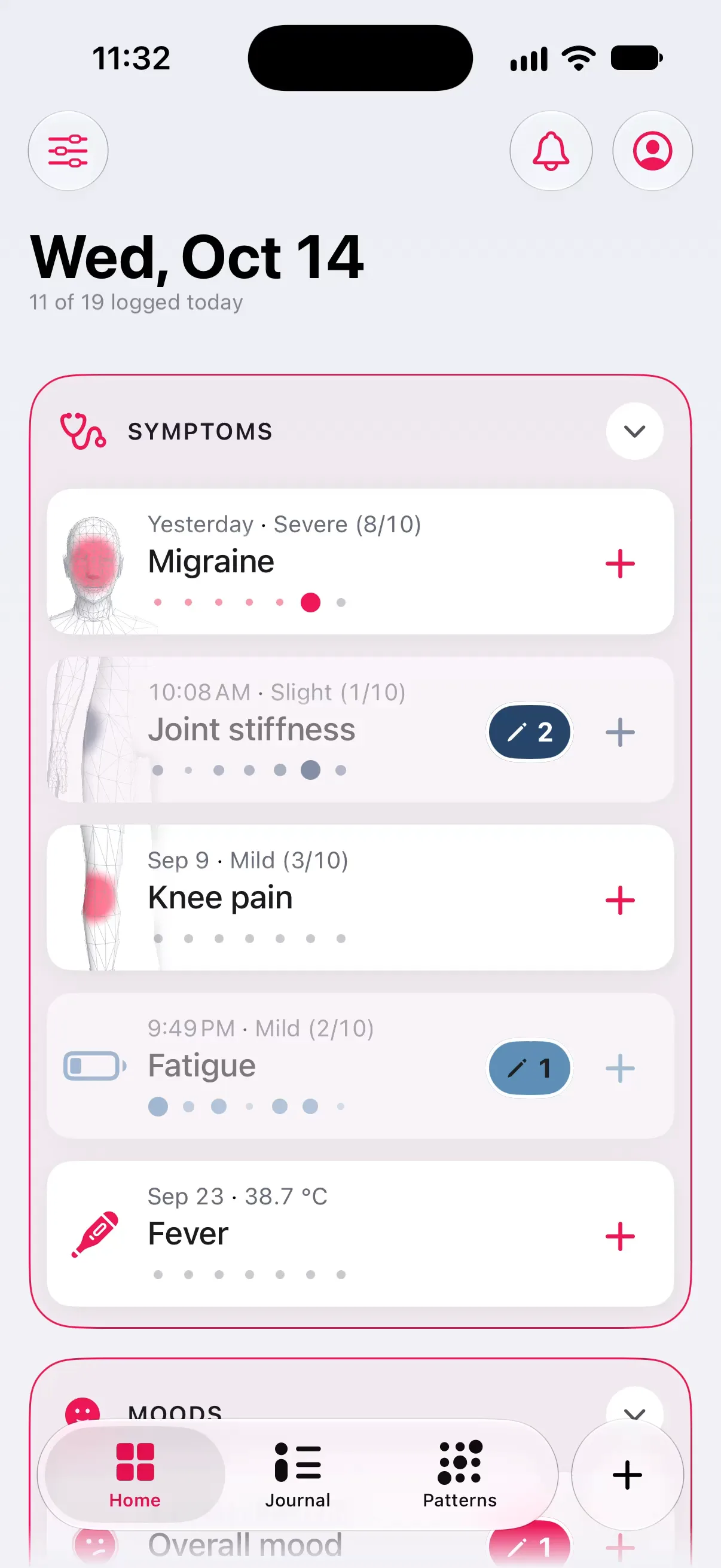
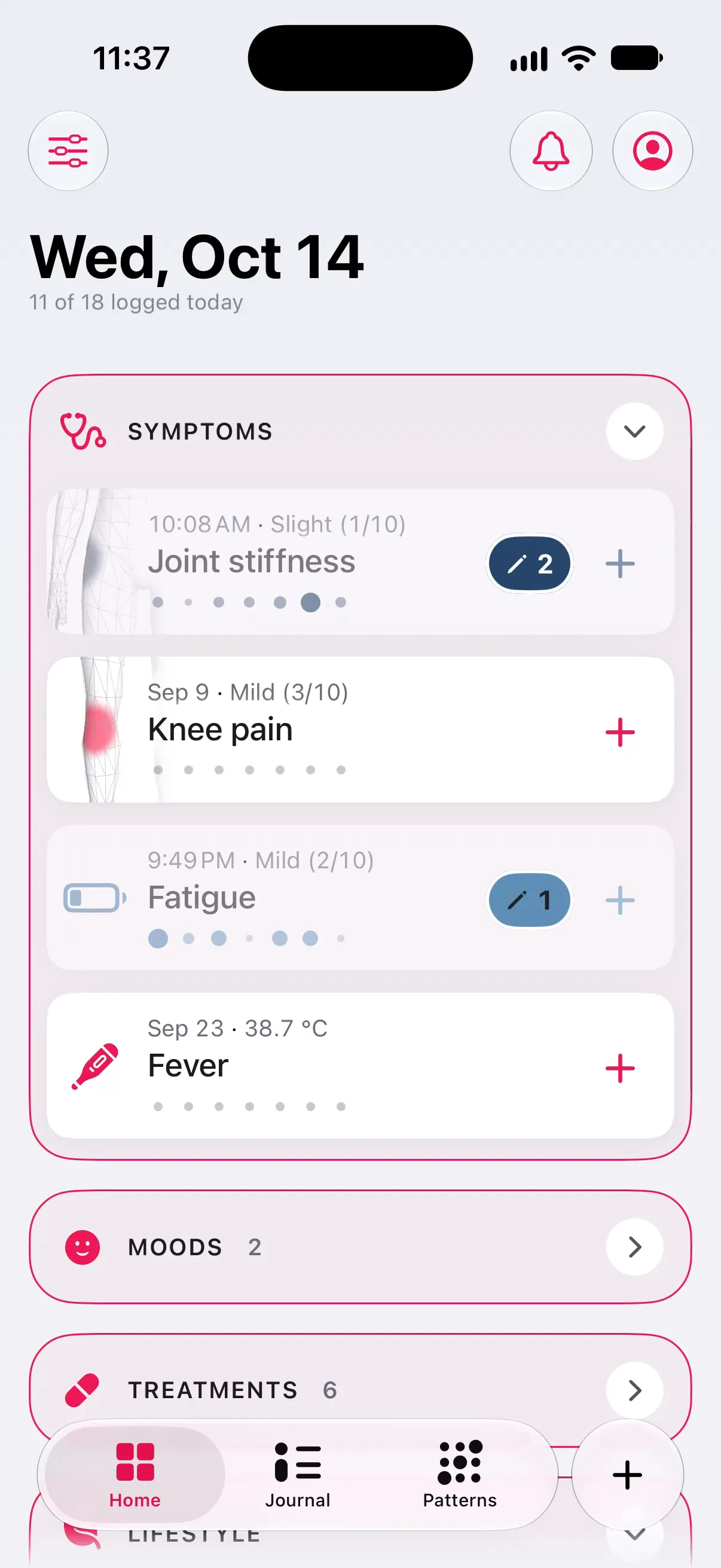
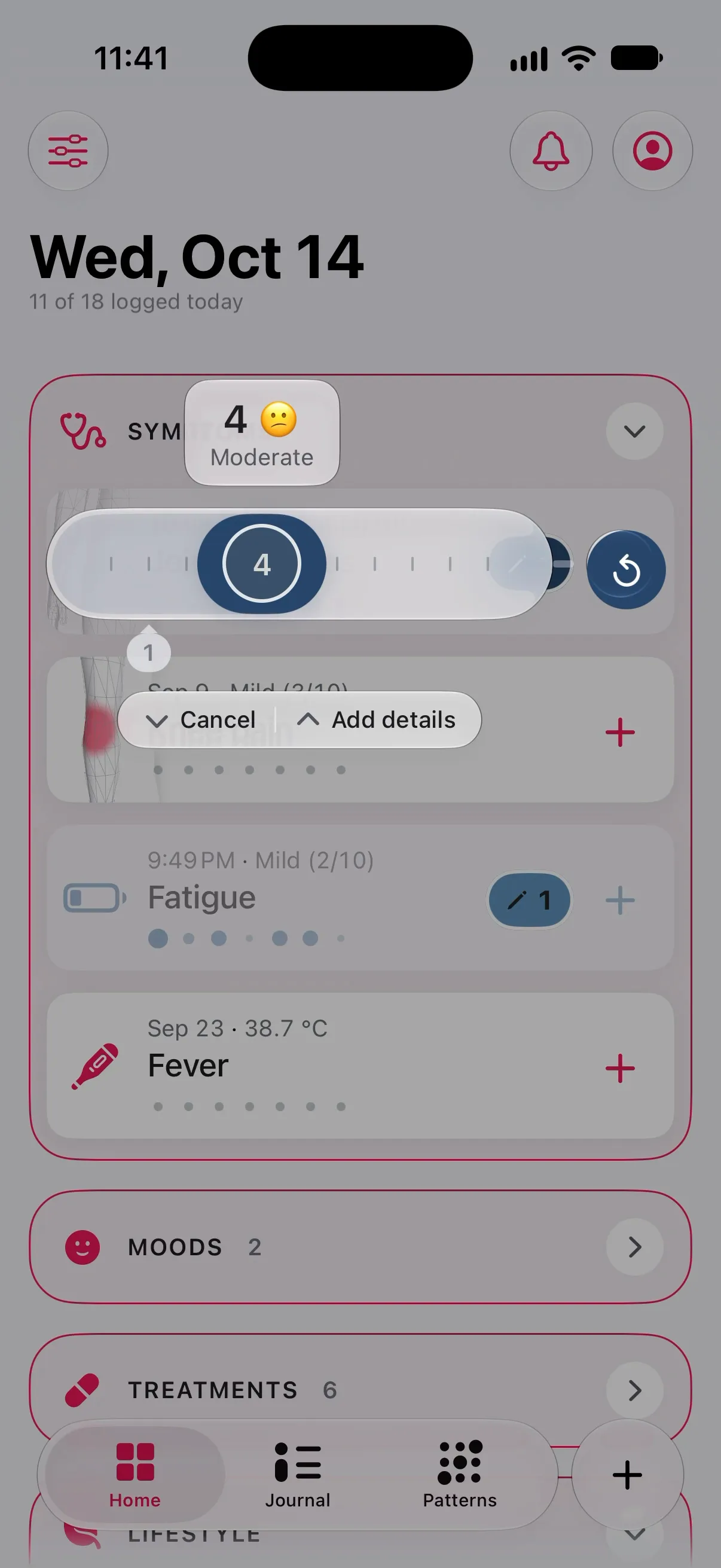
One tap opens a tracker. A couple more set the intensity on a real scale with real anchor words, add where, add a photo. The sheet prefills from last time, so a flare takes a moment to record.
| Measure | What it records | Example |
|---|---|---|
| Scale | Intensity with anchor words | 6 / 10 |
| Duration | How long it lasted | 2 h 15 m |
| Number | A count or a reading | 4 cups |
| Yes / no | Took a treatment, period day | Yes |
| Choices | One or many: triggers, locations | Bright light |
| Photo | A dated picture, kept on the device | Day 12 |
Anchor words sit under the scale’s numbers, so a 4 means the same thing in March and in September.
The full sheet records every measure in the table. A quick log writes a tracker’s main measure (a scale, a duration, a count, a yes or a dose); choices and photos go through the sheet, one tap away.
98 ready-made trackers cover symptoms, moods, treatments, lifestyle, skin and cycle, each with sensible measures already attached. On first launch, a grid of common trackers with Overall mood and Energy already ticked sets up a first week in a few taps. Everything is yours to change.
03Journal
One day · One page
Every day on one page. What mattered, at the top.
The Journal is the long note itself: a timeline of the day, the notes you wrote, and a row of key indicators you choose. Fold the day away and the indicators stay, with the weather beside them.
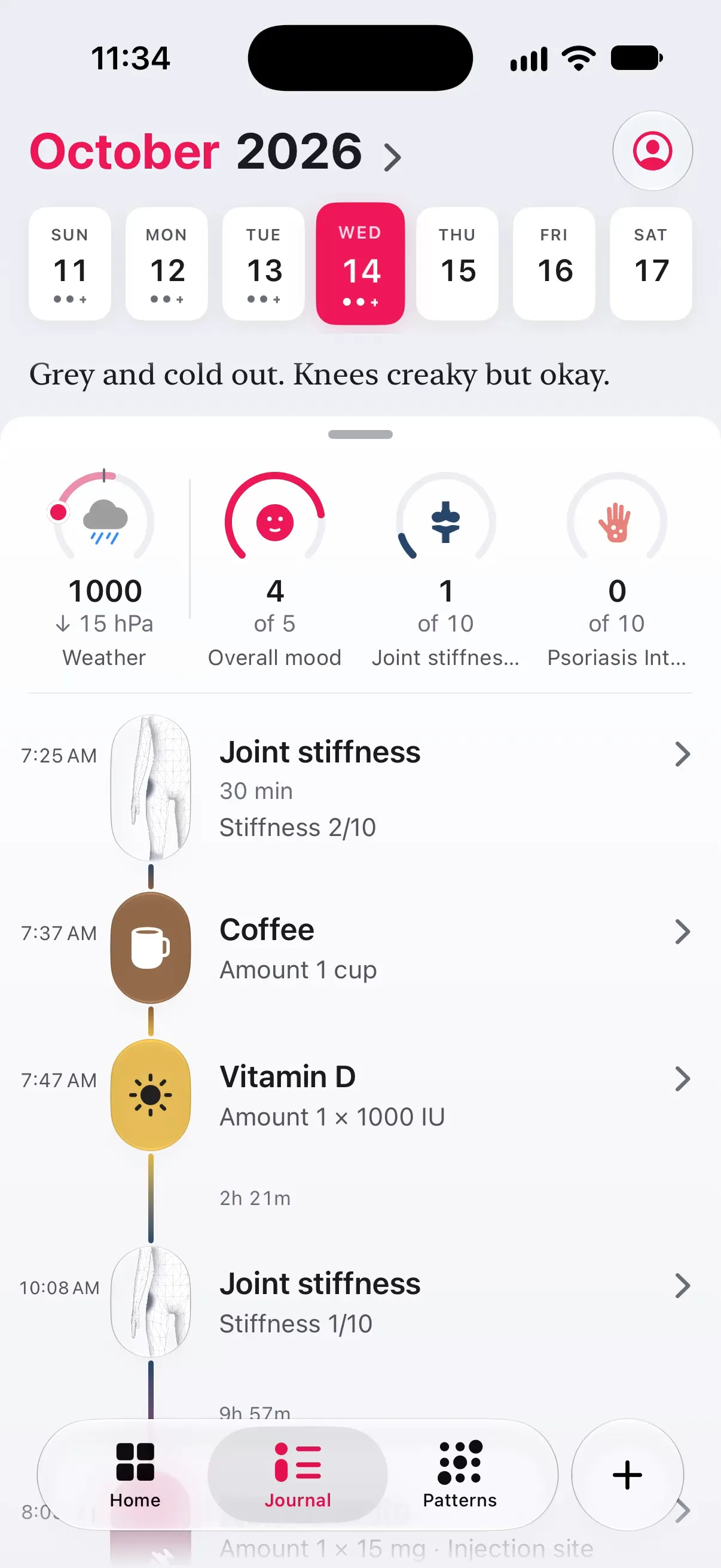
- 01Timeline. Entries sit at the time they happened. A tracker with a body area carries its small body; a duration draws as a bar.
- 02Key indicators. Pick the four or five numbers that matter to you: a mood, hours slept, cups of coffee, the worst symptom. Each is drawn against a reference you choose: the scale’s top, your usual day, a target.
- 03Weather, in the row (Pro). With Pro, the day’s air pressure and how it moved since yesterday, from Apple Weather. It sits in the row like any other key indicator.
- 04The note. Your note for the day, as long as you like, above the timeline, plus timed notes through the day. “Rough morning, took nearly an hour before the knees would bend.”
04Body atlas
73 areas · both sides
Mark where it hurts. Watch it move over months.
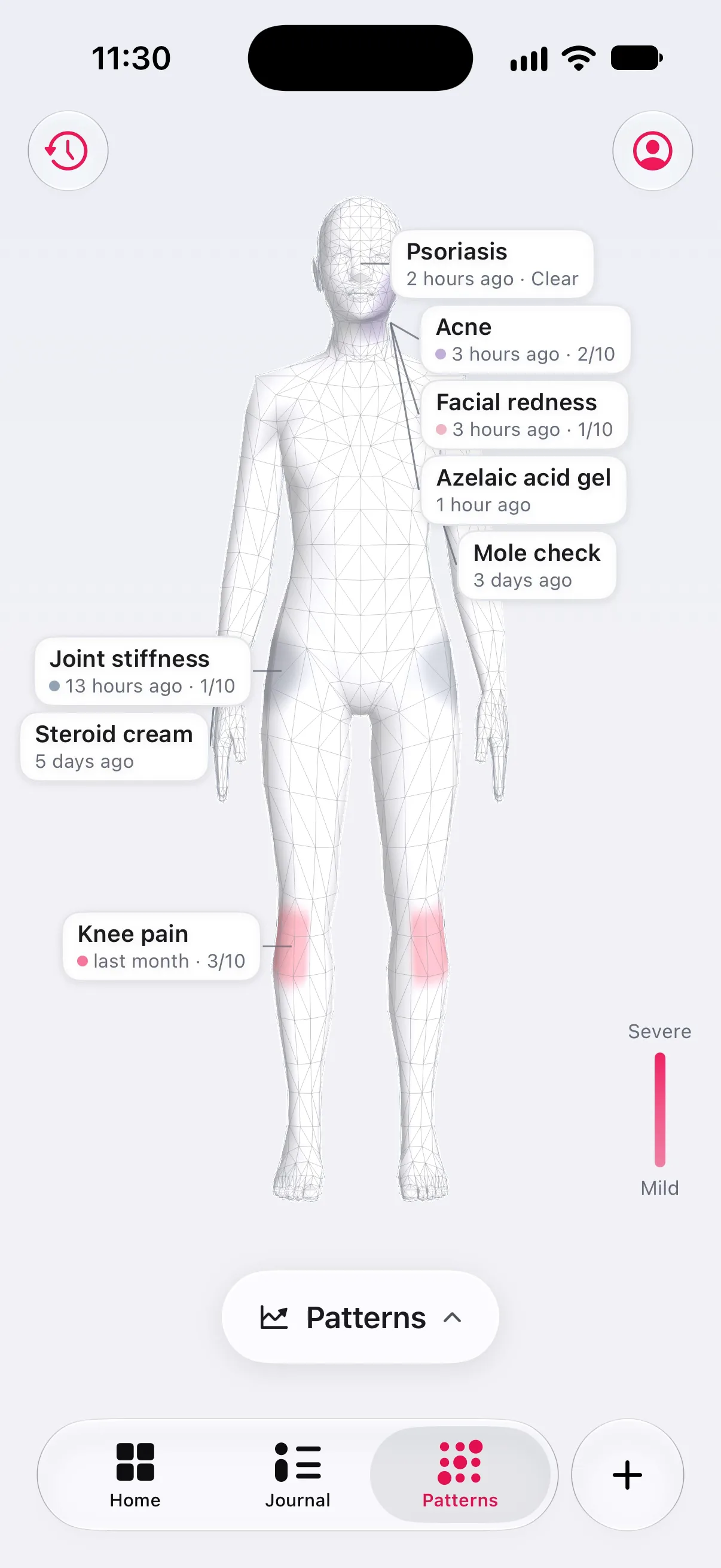
Pain radiates, switches sides, turns up somewhere new. Longnote keeps the place as carefully as the number: a 3-D body with 73 areas, painted in the colour of the tracker that owns them.
Severity as intensity
Hue says which tracker a spot belongs to. Strength says how bad it was. No traffic light, so colour never has to mean two things at once.
- 01Tap an area to mark it, or paint a region with your finger. Mark several spots in one area, then move or remove any of them.
- 02Each tracker card on Home carries a small body, so you see where before you read what.
- 03The atlas remembers: open it and every tracker’s last reading is on the body, dated.
05Patterns
Associations, not causes
Patterns that say how sure they are.
Most trackers draw a confident curve through four data points. Longnote grades every sentence it shows you: an observation, a hint, an early sign, or a pattern that survived a check for false discoveries. When there isn’t enough data yet, it says exactly that.
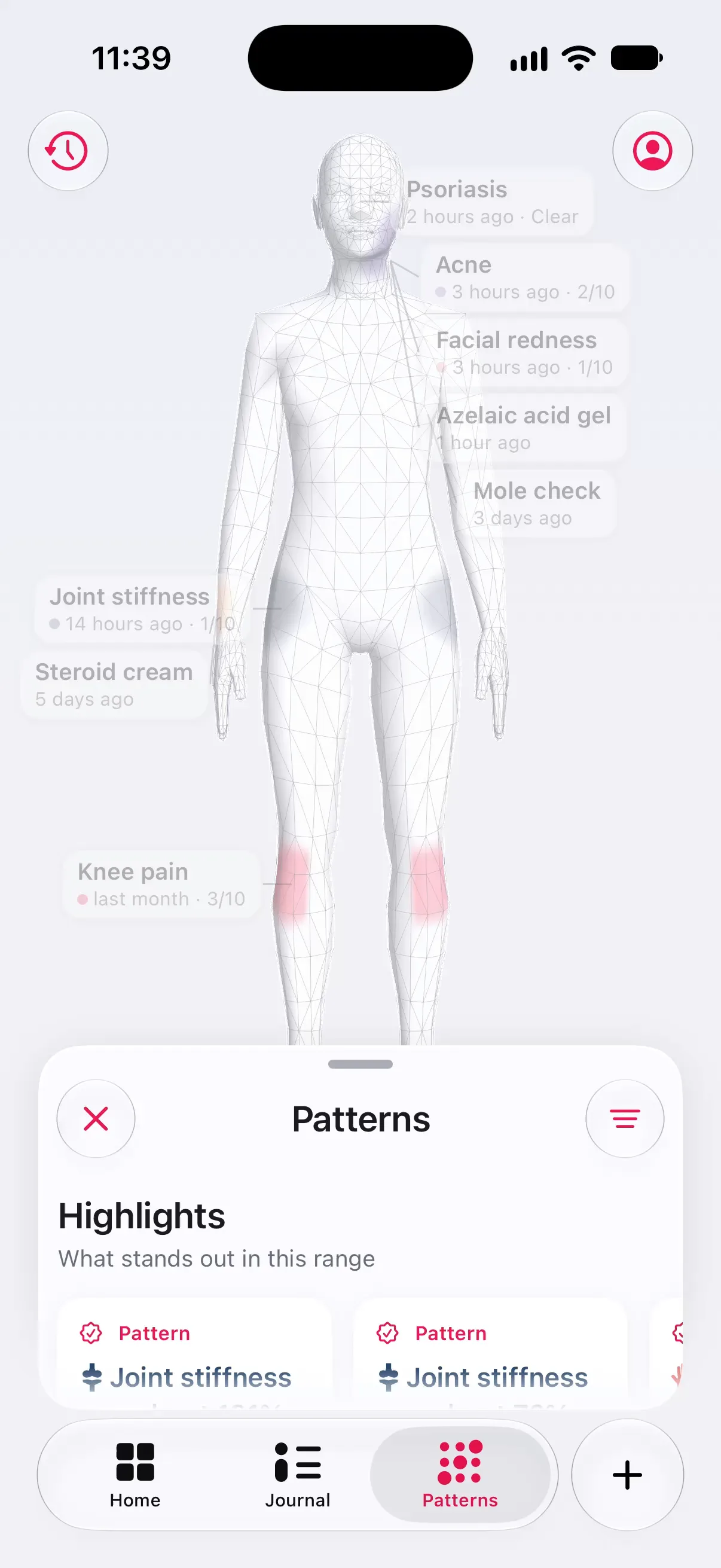
- Observation
A fact about one tracker’s own entries: “On 18 of 30 logged days”. It cannot be wrong, and it claims nothing about why.
- Hint
A possible link where one side of the comparison has only 3 or 4 days. Shown only in browsing lists, like the weather sheet and Moves with it, with both counts. Never in Highlights or the report.
- Early sign
A possible link between two things, worded as a hunch with its day count. Same day or next day only. Highlights show at most one at a time.
- Pattern
A link that survived a false-discovery check across everything the app compared, and still points the same way in the range on screen.
The strength words, weak link, moderate link and strong link, come from how many days overlap and whether the link still holds when the timing shifts by a day. A strong-looking link on twelve days never reads as strong.
06Appointments
A few pages · PDF
Bring a clean record. Spend the visit on the conversation.
The 30-day summary is a few clean pages: each symptom day by day, the treatments under it, how often, how bad, and the body areas involved. Make it from Settings › Summary and share it as a PDF before the appointment, or hand over your phone. It is free, and so is a CSV of everything you ever logged.
| The question | What the record answers |
|---|---|
| How often? | Entries and days with entries, per tracker |
| How bad? | Intensity over time, with the anchors you used |
| Where? | Body areas with counts, left and right |
| What have you tried? | Treatment trackers beside the symptoms |
| Since when? | The period, and how many of its days you logged |
Pro adds other periods (a week, three or six months, or your own dates), choosing which trackers go in, and leaving the Longnote mark off the pages.
for your appointment
| Tracker | Entries | Days |
|---|---|---|
| Migraine | 11 | 9 |
| Neck pain | 23 | 17 |
| Sleep | 30 | 30 |
| Ibuprofen | 7 | 6 |
| Nausea | 5 | 5 |
| Body area | Entries |
|---|---|
| Head | 11 |
| Neck, both sides | 23 |
Drawn on the web to show the structure; the app produces a PDF.
07Privacy
No account · No server
Private by architecture, not by promise.
There is no Longnote account and no Longnote server, so there is nowhere of ours for your record to go. We could not read it if we wanted to. The few features that talk to Apple are named below, each with its own switch, and none of them sends anything to us.
AStays on your iPhone
- ●Every entry, note, photo and body-atlas location
- ●Everything read from Apple Health, which never goes into a backup
- ●The backup passcode, in this iPhone’s keychain only
- ●Your summaries and CSV exports, until you choose to share them
BTalks to Apple, each with its own switch
- ○Encrypted backups, saved to your own iCloud Drive
While Back up to iCloud Drive is on; or save a copy to Files instead - ○A place name you type in, resolved once to coordinates for Apple Weather
Only if you set a weather region - ○The map area of a workout route from Apple Maps, and the icon of the app that recorded it
If a Health workout has a route; Workout maps & app icons turns both off - ○Symptoms written to Apple Health on this iPhone
Only if you turn on Save symptoms to Health - ○Purchases, processed by Apple
Only if you buy Pro; we never see payment details
One thing does reach us: usage statistics through TelemetryDeck, such as which screens and features are used, under an installation identifier with no name attached. They never include your entries, notes, photos, body locations or anything from Apple Health. This website sends nothing at all: no cookies, no analytics, no third-party requests. The full privacy policy names every connection the app can make.
08Accessibility
For the worst days
Built for the worst days, because that is when you log.
Fatigue, brain fog, tremor and low vision travel with chronic illness. Longnote works with VoiceOver, scales to the largest accessibility text sizes, respects Reduce Motion, and logs one-handed lying down.
Large (default) Knee pain · 4/10
AX 1 Knee pain · 4/10
AX 3 Knee pain · 4/10
AX 5 Knee pain · 4/10
Content is never capped. Dense chrome, like calendar strips, stops growing where it would break; the words you wrote keep scaling.
- ●VoiceOver. Every control is labelled, selected states are announced, and the 3-D body is mirrored by accessible text, so nothing lives only in the picture.
- ●Dynamic Type. Grids collapse to one column at accessibility sizes instead of squeezing.
- ●Reduce Motion. Views cross-fade instead of sliding. Nothing loops.
- ●One hand. The add button and the tab bar sit at the bottom, within a thumb’s reach.
- ●This site. WCAG AA contrast in light and dark, reduced motion and reduced transparency respected, complete without JavaScript.
09Begin
iPhone · iOS 26 or later
Start your note today.
Free to download, free to keep. Everything you log stays yours, on your iPhone, in a form you can take anywhere.